Has your Google Business Profile (GBP) suddenly disappeared from Google Search or Google Maps? Don’t panic. A Google Business Profile suspension is more common than many business owners realize, and in most cases, it can be successfully recovered by identifying the issue and submitting the correct evidence.
At SEOcial Solutions, we’ve helped businesses recover suspended Google Business Profiles and regain their online visibility. In this guide, we’ll explain why suspensions happen, how to fix them, and how to prevent them in the future.
What Does a Google Business Profile Suspension Mean?
When your Google Business Profile is suspended, your business listing is removed from Google Search and Maps. Customers won’t be able to find your business, read reviews, or contact you through your profile.
Google typically issues two types of suspensions:
Soft Suspension
- Your profile still appears on
- You lose the ability to manage
- The listing becomes
Hard Suspension
- Your business disappears completely from Google Search and
- The profile is inaccessible until
A hard suspension usually requires immediate action to minimize the impact on your business.
Why Was My Google Business Profile Suspended?
Google suspends listings that violate its Business Profile guidelines. Sometimes, the suspension is automatic, even if you didn’t intentionally break any rules.
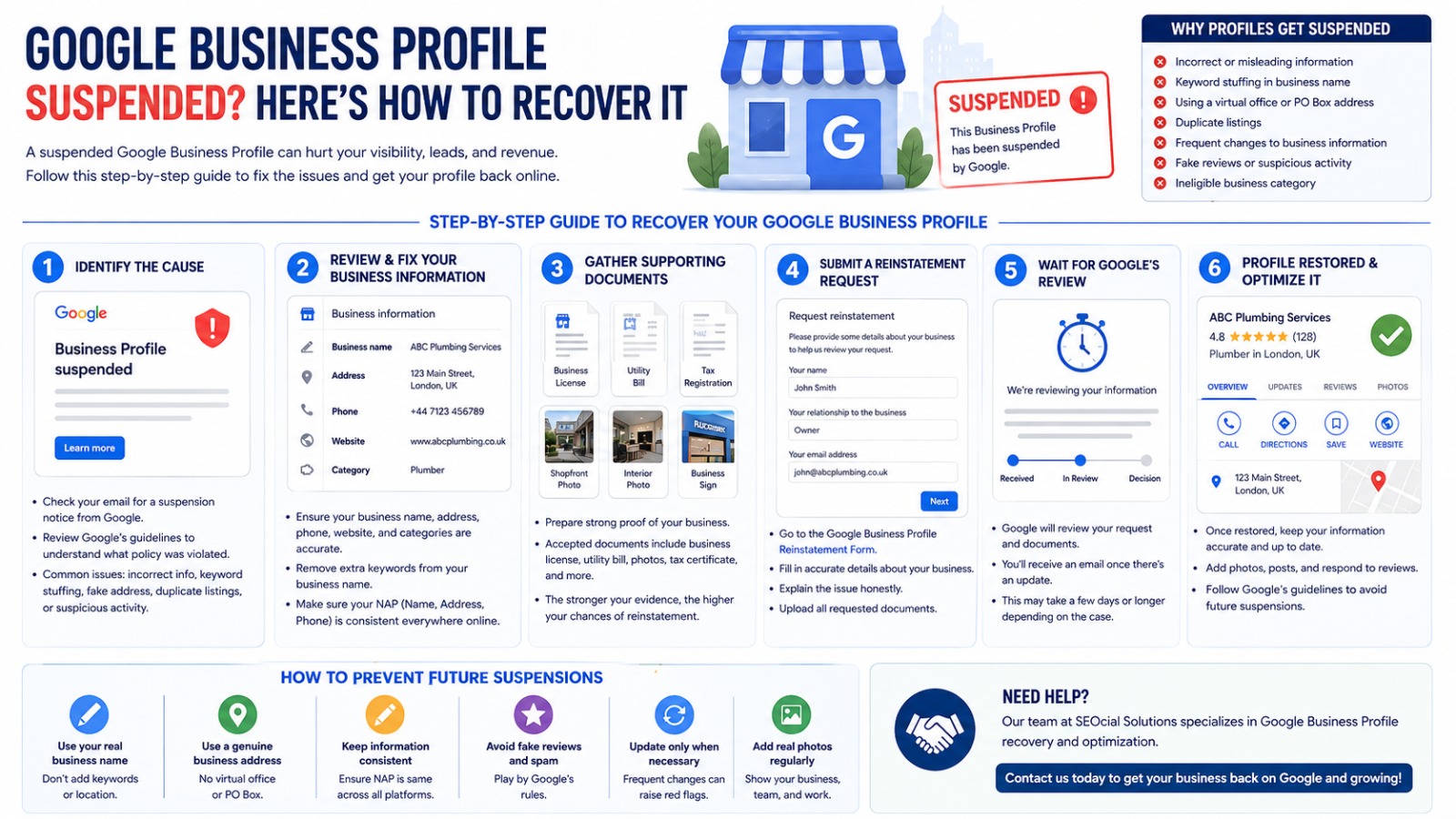
Common reasons include:
1. Incorrect Business Information
- Fake business name
- Keyword stuffing in the business name
- Incorrect address
- Wrong phone number
- Virtual office or PO Box address
2. Service Area Violations
Businesses without a physical storefront should hide their address if they serve customers at their location.
3. Multiple Listings
Creating duplicate listings for the same business can trigger a suspension.
4. Ineligible Business
Businesses that don’t qualify for a Google Business Profile may be suspended.
5. Frequent Information Changes
Constantly editing your:
- Business name
- Address
- Categories
- Website
- Phone number
can trigger Google’s automated review system.
6. Suspicious Activity
Google may suspend profiles if it detects:
- Fake reviews
- Spam
- Misleading information
- Unusual account activity
Signs Your Profile Has Been Suspended
You may notice:
- Your business no longer appears on Google Maps.
- Customers cannot find your
- You receive a suspension email from
- Your Business Profile Manager shows “Suspended.”
- Calls and direction requests suddenly
Step-by-Step Guide to Recover Your Google Business Profile
Step 1: Identify the Cause
Before submitting a reinstatement request, carefully review Google’s Business Profile guidelines. Ask yourself:
- Is my business name exactly as shown on my legal documents?
- Is my address legitimate?
- Am I using a virtual office?
- Have I added unnecessary keywords?
- Have I recently changed important profile information? Correct any violations before proceeding.
Step 2: Gather Supporting Documents
Google may request proof that your business is legitimate. Useful documents include:
- Business registration certificate
- Utility bill
- Business license
- Tax registration
- Shopfront photos
- Interior office photos
- Exterior signage
- Vehicle branding (if applicable)
- Website showing your business information
The stronger your evidence, the better your chances of reinstatement.
Step 3: Update Your Business Information
Ensure your profile matches your official business documents exactly.
Check:
- Business name
- Address
- Phone number
- Website
- Categories
- Opening hours
Consistency across your website, social media, and business directories is essential.
Step 4: Submit a Reinstatement Request
Once you’ve corrected all issues:
- Complete Google’s Business Profile reinstatement
- Upload all requested
- Clearly explain your
- Be honest and
Avoid submitting multiple requests, as this can delay the review process.
Step 5: Wait for Google’s Review
Reinstatement times vary.
Most legitimate businesses receive a response within a few business days, although more complex cases may take longer.
Keep an eye on your email for updates or requests for additional documentation.
Tips to Increase Your Chances of Reinstatement
Follow these best practices:
- Use your official business name
- Never add city names or keywords to your business title.
- Use a genuine business
- Keep your website
- Ensure your contact information is consistent everywhere
- Upload high-quality business
- Respond promptly to any requests from
How to Prevent Future Suspensions
After your profile is restored:
- Avoid unnecessary profile edits.
- Keep your business information
- Never purchase fake
- Follow Google’s Business Profile
- Update your profile only when
- Maintain a professional and trustworthy online
Why Your Google Business Profile Matters
Your Google Business Profile is often the first impression customers have of your business. An optimized profile helps you:
- Rank higher in local search results
- Increase phone calls
- Generate more website visits
- Build trust through customer reviews
- Drive more foot traffic
- Improve local SEO performance
Losing your profile can significantly impact your visibility and revenue, making quick recovery essential.
Need Help Recovering Your Suspended Google Business Profile?
Recovering a suspended Google Business Profile can be frustrating, especially if you’re unsure why it happened. Our team at SEOcial Solutions specializes in Google Business Profile optimization and suspension recovery.
We can help you:
- Identify the reason for the suspension
- Correct profile issues
- Prepare supporting documentation
- Submit a professional reinstatement request
- Optimize your profile after recovery to improve local rankings
Whether you’re a local business, service provider, or multi-location company, we’re here to help you get back on Google and reconnect with your customers.
Contact SEOcial Solutions today to restore your Google Business Profile and strengthen your local online presence.
Frequently Asked Questions (FAQs)
How long does it take to recover a suspended Google Business Profile?
Recovery times vary depending on the case. Some profiles are reinstated within a few days, while others may take longer if additional verification is required.
Can I create a new Google Business Profile after suspension?
No. Creating a new profile instead of fixing the suspended one can violate Google’s guidelines and may lead to additional issues.
Can a suspended profile keep its reviews after reinstatement?
Yes. If your original profile is successfully reinstated, your reviews and historical data are typically restored.
Does changing my business name cause suspension?
It can if the new name violates Google’s naming guidelines or doesn’t match your real-world business branding.
Can SEOcial Solutions help recover my suspended Google Business Profile?
Yes. We assist businesses in diagnosing suspension issues, preparing reinstatement documentation, and optimizing their Google Business Profiles for long-term success.